Form Design to Simplify the Complex
Keurig Brewer Registration Redesign
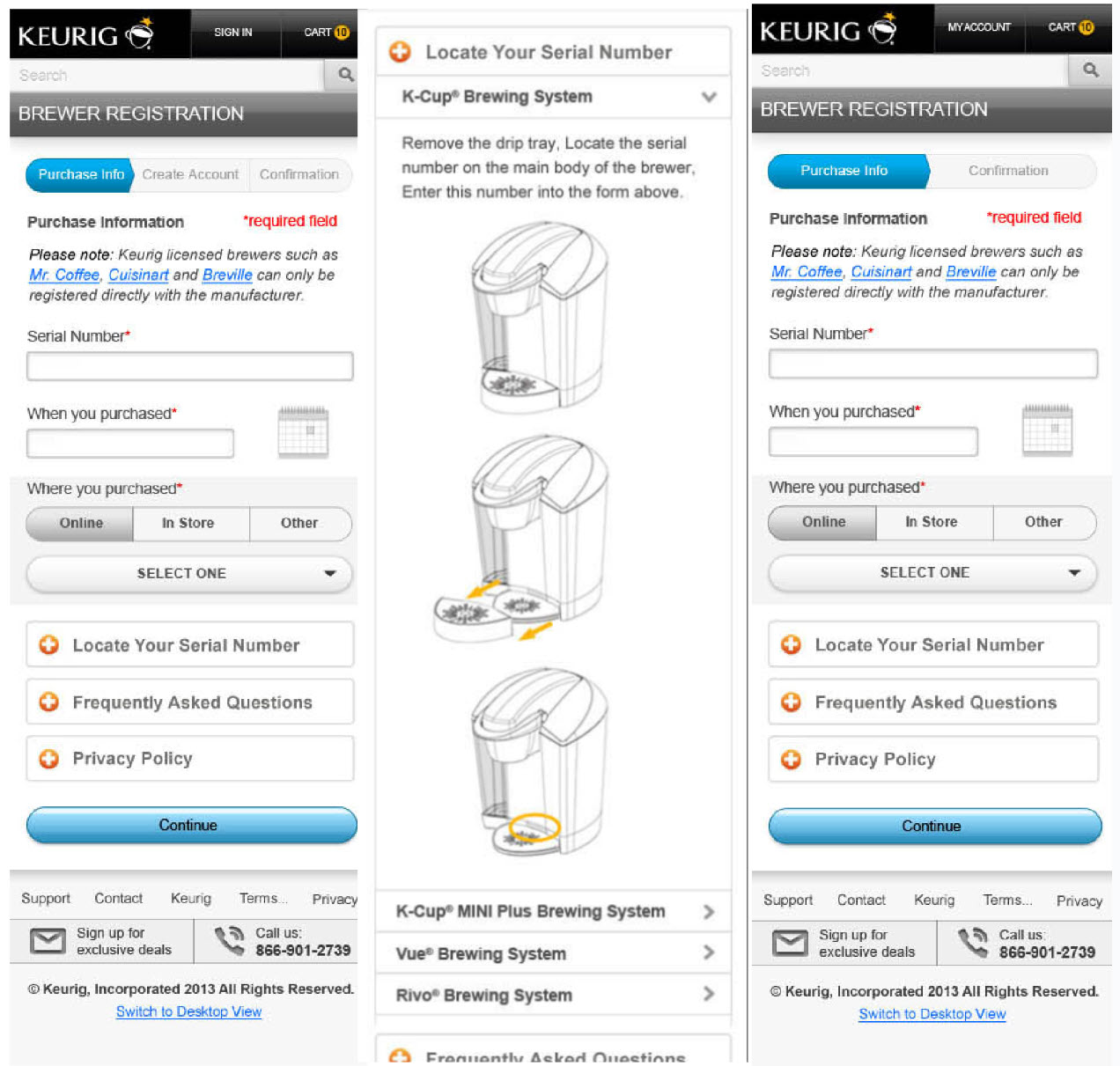
As part of Keurig’s Digital Marketing team, I was asked to optimize the brewer registration process. It was a known sticking point in our lead gen efforts. 1. Users were put off by having to create an account just to register their brewer; 2. Finding the serial number and brewer model # was a challenge.
My process
I conducted usability testing on our current workflow, and a competitive analysis among popular appliance brands such as Nikon, Calphalon and Cuisinart to understand how our registration workflow could be improved. I used Axure to redesign the look and feel of the page and re-ordered the steps so Step 1 had the user enter Brewer specifications and purchase information instead of creating an account. We added an incentive at the end of 2 free boxes of K-cups if the user created an account or signed in.
Why it worked
The new design enabled users to choose their brewer model from a drop down and displayed dynamic content and illustration based on their selection.
By enabling users to easily locate their serial number using relevant copy/illustrations for selected brewer model we increased leads by 48% (our goal was 12%). This amounted to an increase in ROI of $4.2M in annual retail sales.
By displaying clear error/confirmation alerts, we decreased brewer registration calls to the call center by 28%.
Simplifying Carbon Data Entry
For climate metrics, The Nature Conservancy needed to better understand how the work was making an impact. Reporting progress was complicated fo the reporter who typically didn’t understand climate science.
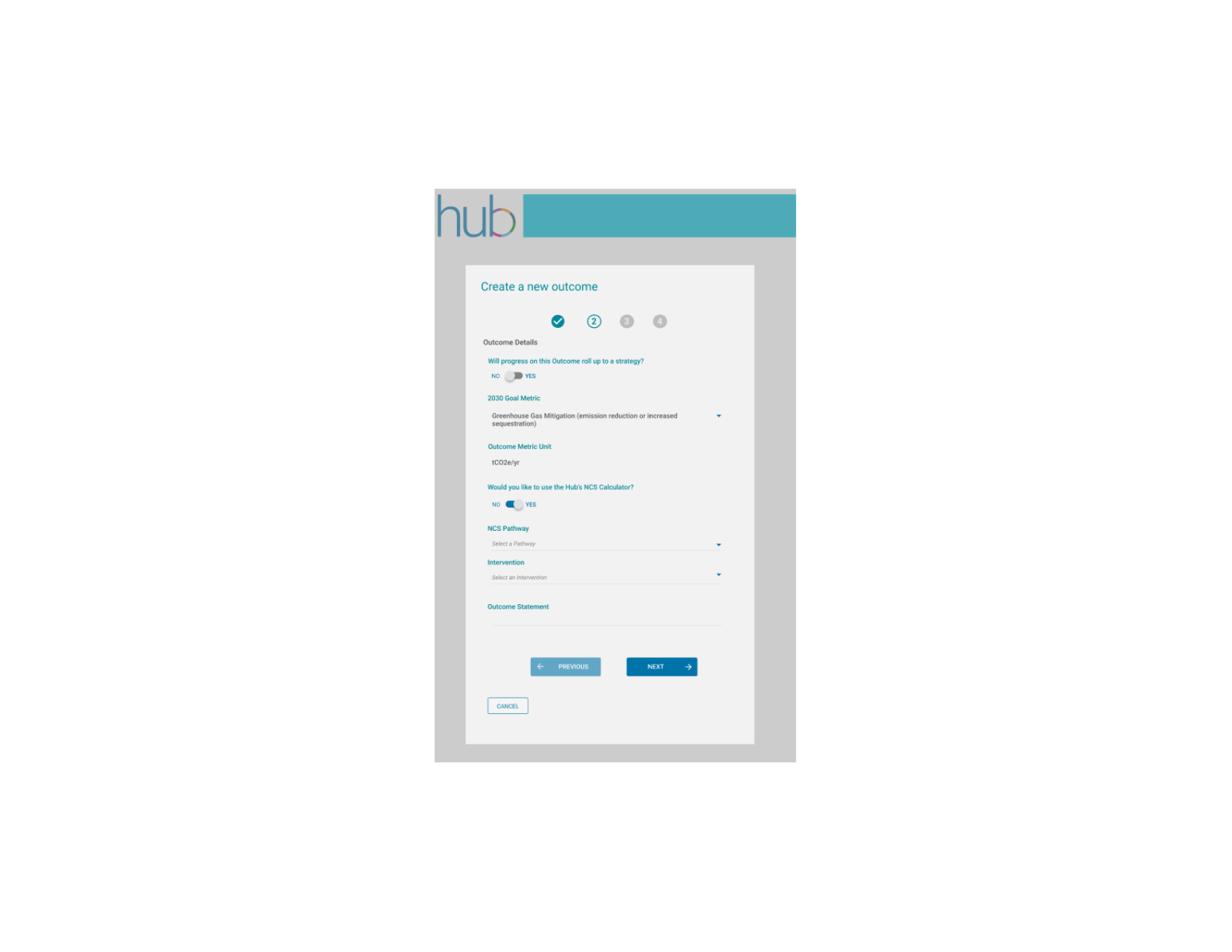
We designed a reporting mechanism that would calculate progress based on the NCS pathway, location, and spatial extent.
The result was a workflow that seamlessly blended with our current outcome metrics reporting tool and that noticeably improved usability, and thus adoption of the tool.
My process
After extensive usability testing with internal data administrators, climate scientists and data reporters, I designed a workflow using Figma that simplified the complex process and broke it down into easily managed chunks:
Screen 1: Choose a Metric, a Pathway and an Intervention;
Screen 2, Choose a spatial extent and location;
Screen 3: Use standard NCS data or custom data and calculate the target value
Why it worked
The new design enabled data reporters to choose the NCS Pathway from a drop down. Conditional logic helped them complete the form. I built into the design increased flexibility for teams who were more savvy with their carbon calculations and wanted to use their own formulas rather than the one we hard-coded using standardized data.
Our survey responses from data reporters showed a 55% increase in confidence when entering carbon data.
Viewing and Editing with Permission
The Nature Conservancy wanted to better understand progress it was making in 10 unique outcome metrics across our global strategies.
Conservation leadership wanted clear indications of when to pivot a strategy, when to abort a strategy and when to stay the course.
The problem was, most of our progess data that was available to senior leadership was difficult to find and share, and didn’t support this level of decision making.
My process
I interviewed project teams across the globe to understand their process for recording data, who was recording the data, what level of knowledge they had, and what information was missing in existing reporting mechanisms.
I then started designing a series of MVP workflows in Figma and put them through rigorous task-based usability testing. I gathered all the feedback in remote, recorded sessions and used Miro to lead collaborative sessions with conservation leadership. We categorized the user feedback using afinity diagrams and prioritization exercises to build a strategy to tackle the important items. Most of the feedback centered around disconnects between how the tool structured information and how data reporters, project teams and strategy leads considered data at the local level.
Why it worked
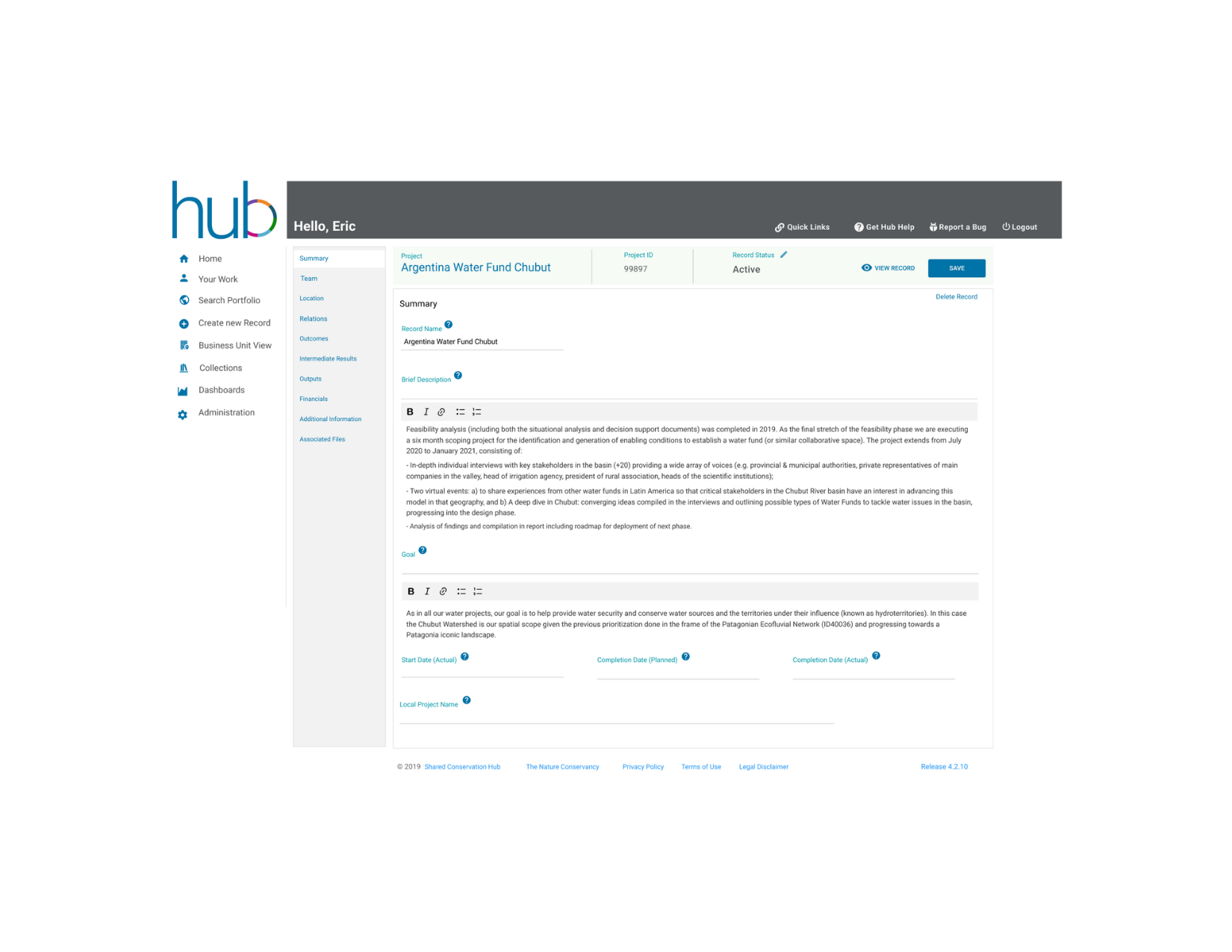
By making small label changes and adding minor help text and functionality, we made our conservation teams’ jobs easier. Data reporters especially appreciated that:
- An editor may choose to update the record status to Active, Canceled, Inactive or Completed.
- Users with permission to edit a record, would see an enabled edit button and were able to edit any fields or whole sections of the record. The View Record button toggles to Edit Record when in view mode.
- Only admins are authorized to delete a record so this button would not show for general users.
- Every field included help text to assist data reporters in completing the field. As this was a new process, our help text database was extremely useful to new users.
- Rich text formatting helped them create more readable descriptions and goals.
Testimonials
Working with Wendy is like a breath of fresh air! She has an in-depth knowledge of usability best practices and combines it with the perfect balance of intense work ethic and fun. She is analytical, yet sensitive to user needs and is able to think outside of the box while always keeping usability best practices in mind. I enjoy working with her. She is open to experimenting with new design concepts while simultaneously ensuring the designs are inline with her organization's goals and parameters. I look forward to collaborating with her again in the near future!
Tony Moreno – Founder and CEO @ Brave Concept